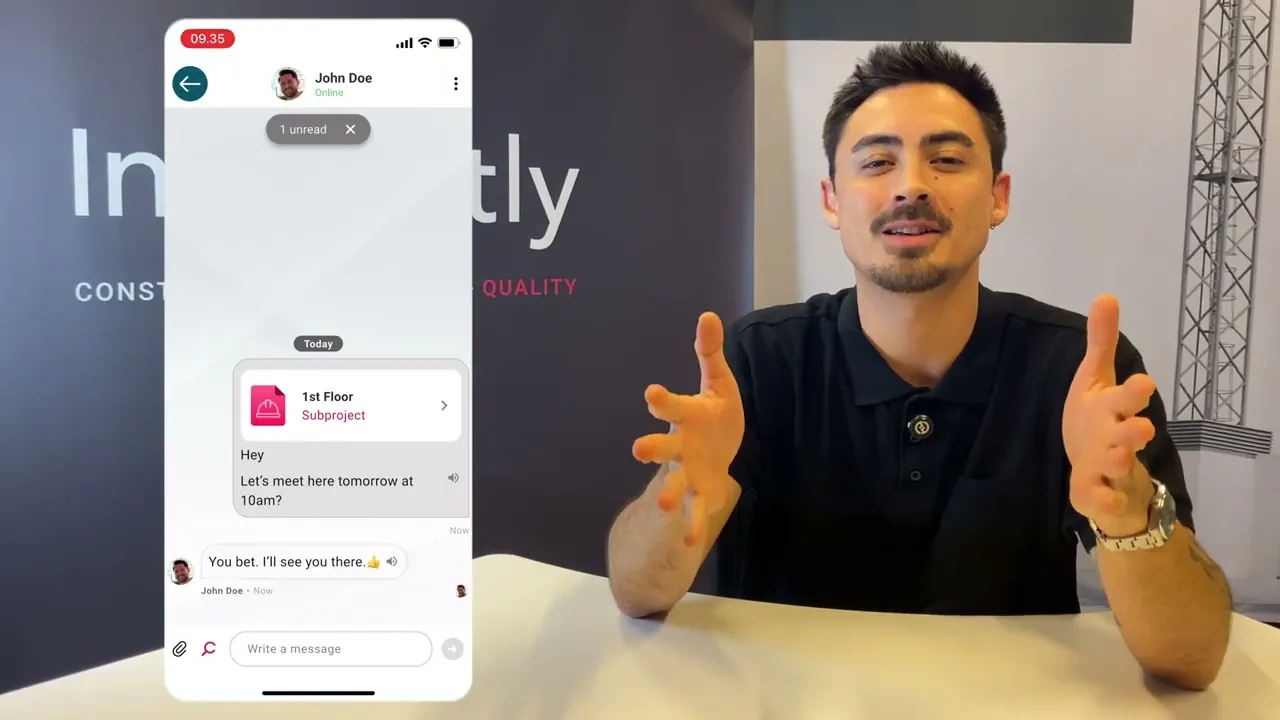

A place for all communication - created for the everyday in construction
A place for all communication - created for the everyday in construction
A place for all communication - created for the everyday in construction
A place for all communication - created for the everyday in construction
Send messages as easily as an SMS with Flow. Posts, channels, project rooms, and messages - directly in Inspectly.
Send messages as easily as an SMS with Flow. Posts, channels, project rooms, and messages - directly in Inspectly.
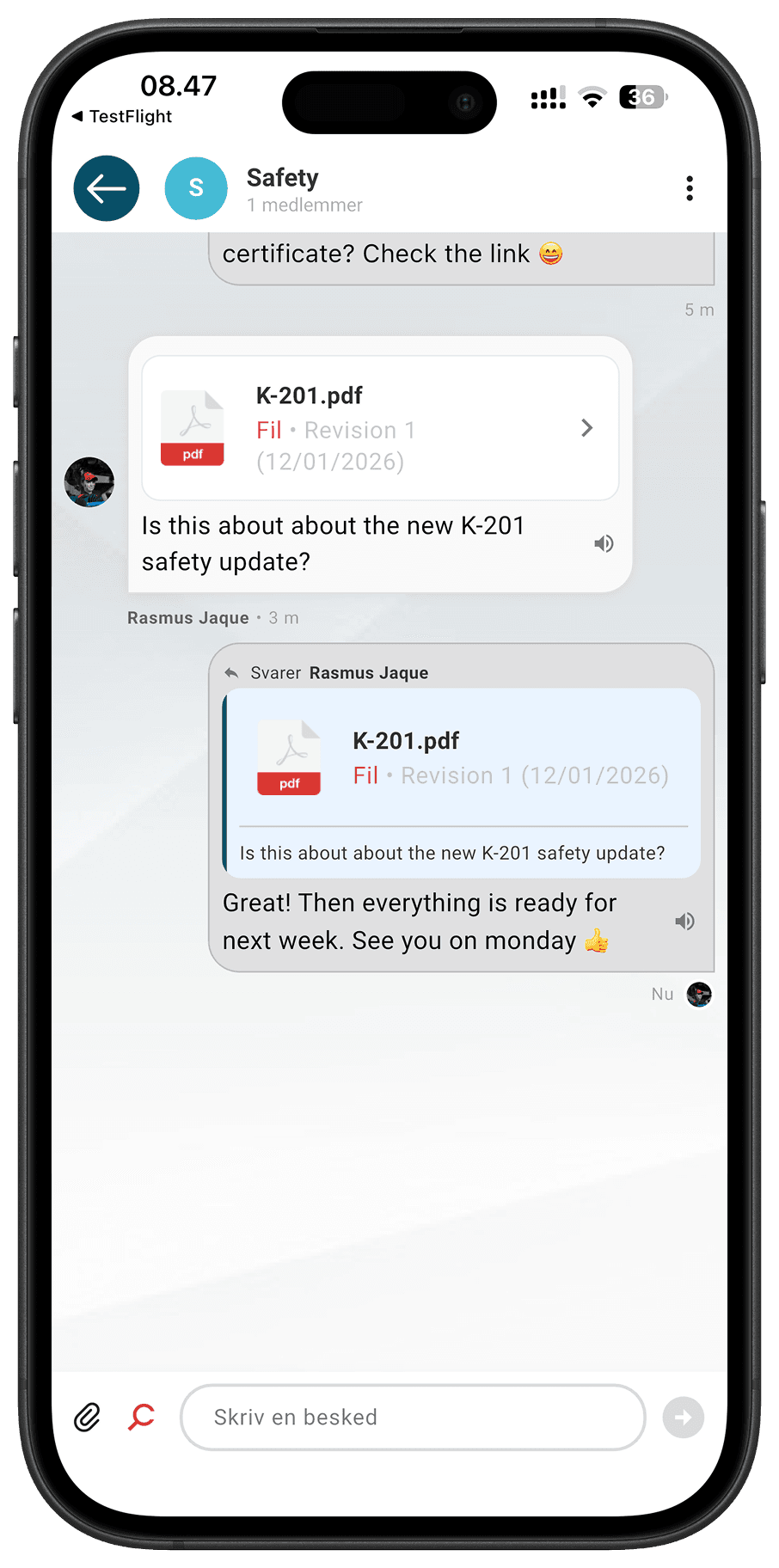
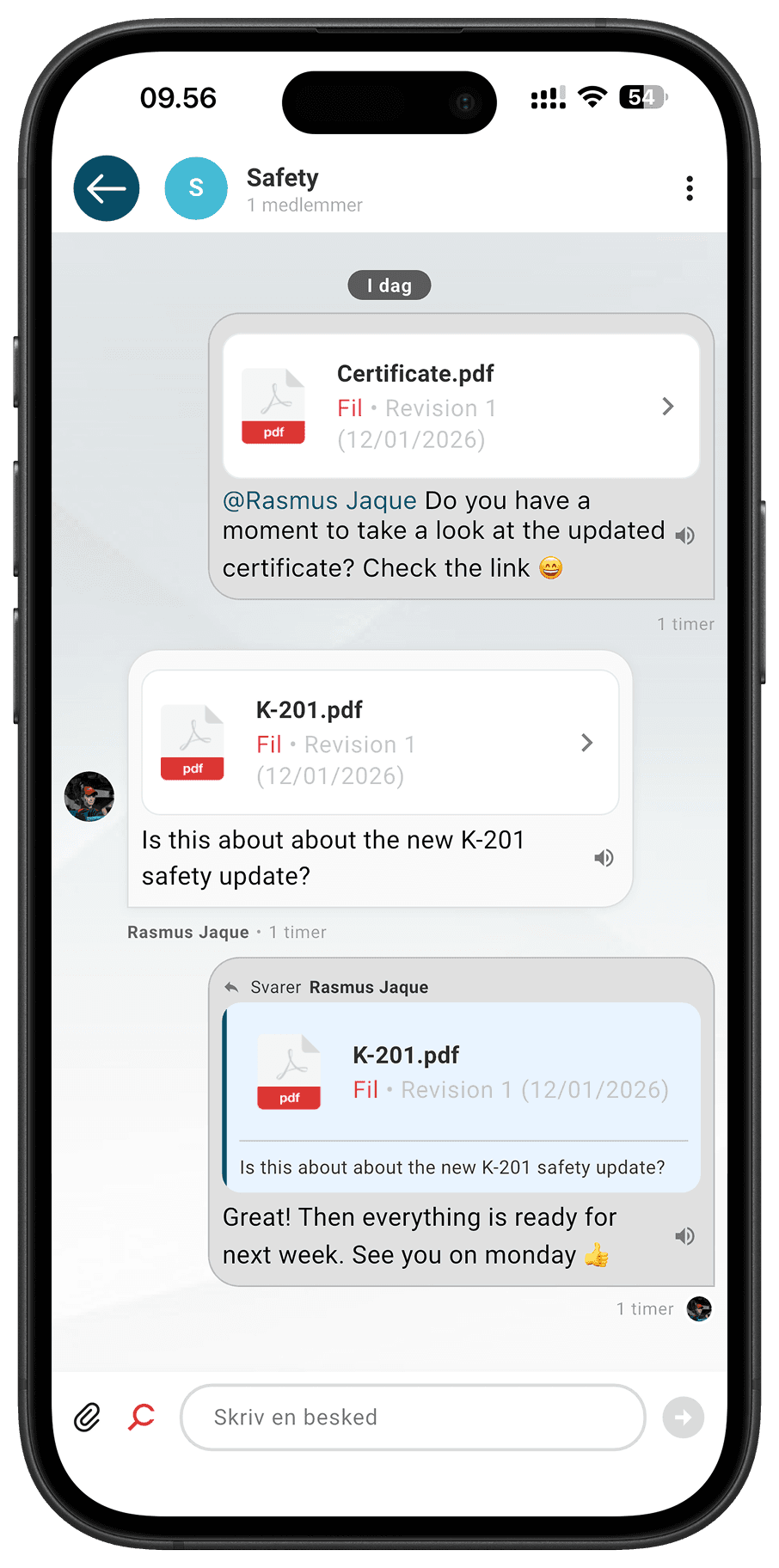
Flow - Get in the loop in just 2 minutes
Flow - Get in the loop in just 2 minutes
Flow - Get in the loop in just 2 minutes
See for yourself how easy it is to get started with Flow. Inspectly Hub walks you through the app in just 2 minutes, so you can see how quickly you can communicate with everyone in your company.
See for yourself how easy it is to get started with Flow. Inspectly Hub walks you through the app in just 2 minutes, so you can see how quickly you can communicate with everyone in your company.
Get Flow today
Why should you choose Inspectly Flow?
Why should you choose Inspectly Flow?
Why should you choose Inspectly Flow?
All communication gathered in one place
Finally, it's over with SMS messages, emails, and loose chats. All internal dialogue and knowledge sharing is in one employee app.
All communication in one place
Finally, the end of SMSs, emails, and loose chats. All internal dialogue and knowledge sharing is in one employee app.
Full overview of agreements
Messages, tasks, and quality assurance are interconnected. Everyone can see what has been agreed upon without having to search in multiple places.
Full overview of agreements
Messages, tasks, and quality assurance are interconnected. Everyone can see what has been agreed upon without having to search several places.
Save precious time every single day
Less coordination across platforms means fewer misunderstandings and more time for what actually drives progress.
Save precious time every single day
Less coordination across platforms means fewer misunderstandings and more time for what actually drives progress.
This is how Flow works
This is how Flow works
Bulletin board - share information with the entire company at once
Bulletin board - share information with the entire company at once
Bulletin board - share information with the entire company at once
Share news, new safety regulations, practical messages, and internal updates in one fixed place for the entire company.
Everyone knows exactly where the information is – even when it needs to be found again later.
Like and comment: React quickly to a post and create a comment
Like and comment: React quickly to a post and create a comment
Reactions: Use emojis to react quickly – without filling up the comment field
Reactions: Use emojis to react quickly – without filling up the comment field
@mentions: Tag colleagues directly in posts, so they are notified about something important
@mentions: Tag colleagues directly in posts, so they are notified about something important
Read more: Long posts are displayed in a compressed format, so the feed remains manageable – click to see the entire message
Read more: Long posts are displayed in a compressed format, so the feed remains manageable – click to see the entire message
Searchable history: Easily find your way back to previous postings through the search function – no messages are lost
Searchable history: Easily find your way back to previous postings through the search function – no messages are lost

Project room – communicate directly with professional groups and subcontractors in the project
Project room – communicate directly with professional groups and subcontractors in the project
Project room – communicate directly with professional groups and subcontractors in the project
Create targeted channels and posts, and keep the dialogue in the context it belongs to. Messages, decisions, and clarifications remain on the project – so everyone works from the same, updated information.
Go directly to project: Go directly from Flow to the project with quick shortcuts
Go directly to project: Go directly from Flow to the project with quick shortcuts
Project Posting: Create postings on the project bulletin board so that your postings are only read by the project participants
Project Posting: Create postings on the project bulletin board so that your postings are only read by the project participants
Project channels: Respond to specific messages so that the thread remains manageable and the context is clear
Project channels: Respond to specific messages so that the thread remains manageable and the context is clear
Channels per subject group: Create dedicated channels for carpenters, electricians, or others – so the messages reach the right people
Channels per subject group: Create dedicated channels for carpenters, electricians, or others – so the messages reach the right people
Channels per subcontractor: Create dedicated channels for subcontractors – so your messages are read by the right people
Channels per subcontractor: Create dedicated channels for subcontractors – so your messages are read by the right people
Channels – communicate across projects about specific topics
Channels – communicate across projects about specific topics
Channels – communicate across projects about specific topics
Communicate with your colleagues on several different channels about topics such as safety, quality, or working environment. For example, create a channel for HSE personnel where new procedures can be shared, discussed, and anchored in one common place.
Target Groups: Create channels for specific professional groups, groups, or topics – so messages only go to those who need to receive them
Target Groups: Create channels for specific professional groups, groups, or topics – so messages only go to those who need to receive them
Always available history: New members can scroll back and see previous conversations – no important context is lost
Always available history: New members can scroll back and see previous conversations – no important context is lost
Share files and images: Attach drawings, photos, or documents directly in the channel, so everything is gathered in one place
Share files and images: Attach drawings, photos, or documents directly in the channel, so everything is gathered in one place
Notifications on demand: Turn notifications on or off per channel – so you are only disturbed by what is important
Notifications on demand: Turn notifications on or off per channel – so you are only disturbed by what is important
Search across: Quickly find messages, files, or decisions using the search function
Search across: Quickly find messages, files, or decisions using the search function
Direct conversations – write one-on-one with your colleagues
Direct conversations – write one-on-one with your colleagues
Direct conversations – write one-on-one with your colleagues
Stop sending SMS messages where important information gets lost. With direct conversations, you can ask a quick question to your colleagues, provide feedback, or get clarification – without having to leave the platform.
1-to-1 conversations: Write directly to a colleague without creating a channel or group
1-to-1 conversations: Write directly to a colleague without creating a channel or group
Reactions and replies: Use emojis for quick acknowledgment, or reply to specific messages in the thread
Reactions and replies: Use emojis for quick acknowledgment, or reply to specific messages in the thread
Share files privately: Send images, documents, or drawings directly to one person
Share files privately: Send images, documents, or drawings directly to one person
Reading aloud: Get messages read out loud when you are on the go or busy
Reading aloud: Get messages read out loud when you are on the go or busy
Overview: All your direct conversations are in one place – easy to find and follow up on
Overview: All your direct conversations are in one place – easy to find and follow up on
Direct link to projects, files, and drawings
Direct link to projects, files, and drawings
Direct link to projects, files, and drawings
Forget about searching for case numbers, project names, and file paths. With Flows link, you can link directly to projects, files, and drawings – right in a message or a post. Communication and documentation finally go hand in hand.
Link to projects: Share a direct link to a project – the recipient opens it with one click
Link to projects: Share a direct link to a project – the recipient opens it with one click
Link to subprojects: Refer to a specific subproject, so there is no doubt about which part of the project you are talking about
Link to subprojects: Refer to a specific subproject, so there is no doubt about which part of the project you are talking about
Link to global files: Link to the company's shared files and documents that are not tied to a specific project
Link to global files: Link to the company's shared files and documents that are not tied to a specific project
Link to project files: Link directly to a specific file in a project – no need to navigate through folders
Link to project files: Link directly to a specific file in a project – no need to navigate through folders
Link to project drawings: Share a direct link to a drawing so everyone looks at the same version
Link to project drawings: Share a direct link to a drawing so everyone looks at the same version
Communicate easily regardless of language, role, and work situation
Communicate easily regardless of language, role, and work situation
Communicate easily regardless of language, role, and work situation
Get in touch with your colleagues, whether you need translation into another language, speech-to-text, text-to-speech, or having posts and messages read aloud. Flow ensures that your information gets through.
Get in touch with your colleagues, whether you need translation into another language, speech-to-text, text-to-speech, or having posts and messages read aloud. Flow ensures that your information gets through.
Translation to over 150 languages: Get messages automatically translated so everyone on site can read and understand – regardless of native language
Translation to over 150 languages: Get messages automatically translated so everyone on site can read and understand – regardless of native language
Speech to text: Dictate your message instead of typing – convenient when you're wearing gloves or are in a hurry
Speech to text: Dictate your message instead of typing – convenient when you're wearing gloves or are in a hurry
Text to speech: Get text converted to speech so you can listen instead of read
Text to speech: Get text converted to speech so you can listen instead of read
Read posts and messages aloud: Get messages read directly in the app – stay focused on work while you listen
Read posts and messages aloud: Get messages read directly in the app – stay focused on work while you listen
Universal search: Search across posts, project rooms, channels, and messages – quickly find what you're looking for, all in one place
Universal search: Search across posts, project rooms, channels, and messages – quickly find what you're looking for, all in one place
Flow works – because everyone can use it
Flow works – because everyone can use it
Management
Management
More overview, fewer misunderstandings, and better decision-making basis.
Project managers
Project managers
Clear communication, documentation, and history collected in one place.
Chairmen and gangs
Chairmen and gangs
Quick answers, less noise, and less time spent searching for information.
Subcontractors
Subcontractors
Clear agreements and access to the right information – without chaos.
Why does communication still create problems in construction?
Why does communication still create problems in construction?
Why does communication still create problems in construction?
In most projects, the dialogue is still scattered in texts, emails, WhatsApp threads, and various apps. And it works until important knowledge gets lost in the mix, and the overview is lost.
When communication is not centralized in one place, this happens here:
When communication is not centralized in one place, this happens here:
Small misunderstandings turn into costly mistakes
Small misunderstandings turn into costly mistakes
Safety and quality information does not reach in time
Safety and quality information does not reach in time
It is unclear who has said what - and when
It is unclear who has said what - and when
With Flow, you put an end to fragmented communication. All internal communication and project communication is contained in a single employee app.

See the launch of Flow
See the full presentation where we launch Inspectly Flow. Here we explain why communication is one of the biggest challenges in construction - and show how Flow brings it all together in practice.
Try flow today
See the launch of Flow
See the full presentation where we launch Inspectly Flow. Here we explain why communication is one of the biggest challenges in construction - and show how Flow brings it all together in practice.
Try flow today
See the launch of Flow
See the full presentation where we launch Inspectly Flow. Here we explain why communication is one of the biggest challenges in construction - and show how Flow brings it all together in practice.
Try flow today
See the launch of Flow
See the full presentation where we launch Inspectly Flow. Here we explain why communication is one of the biggest challenges in construction - and show how Flow brings it all together in practice.
Try flow today
800+ Danish companies are already using Inspectly
800+ Danish companies are already using Inspectly
800+ Danish companies are already using Inspectly







"Inspectly Flow is the future of communication in construction. We believe that better collaboration creates better construction projects – and that communication should be as structured as quality"
"Inspectly Flow is the future of communication in construction. We believe that better collaboration creates better construction projects – and that communication should be as structured as quality"
"Inspectly Flow is the future of communication in construction. We believe that better collaboration creates better construction projects – and that communication should be as structured as quality"
Torben Kovaltsenko Jørgensen
Torben Kovaltsenko Jørgensen
Torben Kovaltsenko Jørgensen
CEO & Partner at Inspectly
CEO & Partner at Inspectly
CEO & Partner at Inspectly
Flow FAQ
Flow FAQ
Flow FAQ
When can I start using Flow?
How do I get access to Flow?
Do I need to download a new app to use Flow?
Can I connect a subcontractor to Flow?
Can you gain access to Flow without an existing Inspectly license?
What is the cost of a Flow license?
Is Flow included in my current Inspectly license?
Is Flow included in my Knowledge and Communication license?
What is a Build license?
What is a Flow license?
When can I start using Flow?
How do I get access to Flow?
Do I need to download a new app to use Flow?
Can I connect a subcontractor to Flow?
Can you gain access to Flow without an existing Inspectly license?
What is the cost of a Flow license?
Is Flow included in my current Inspectly license?
Is Flow included in my Knowledge and Communication license?
What is a Build license?
What is a Flow license?
Would you like to know more?
Go to Inspectly Help Center
Contact
Address
Lægårdsvej 24
8520 Lystrup
Sign up for our newsletter
Get direct notifications when we share knowledge and insights in the industry as well as news about our solutions.


Contact
Address
Lægårdsvej 24
8520 Lystrup
Sign up for our newsletter
Get direct notifications when we share knowledge and insights in the industry as well as news about our solutions.
Contact
Address
Lægårdsvej 24
8520 Lystrup
Sign up for our newsletter
Get direct notifications when we share knowledge and insights in the industry as well as news about our solutions.
Contact
Address
Lægårdsvej 24
8520 Lystrup
Sign up for our newsletter
Get direct notifications when we share knowledge and insights in the industry as well as news about our solutions.